
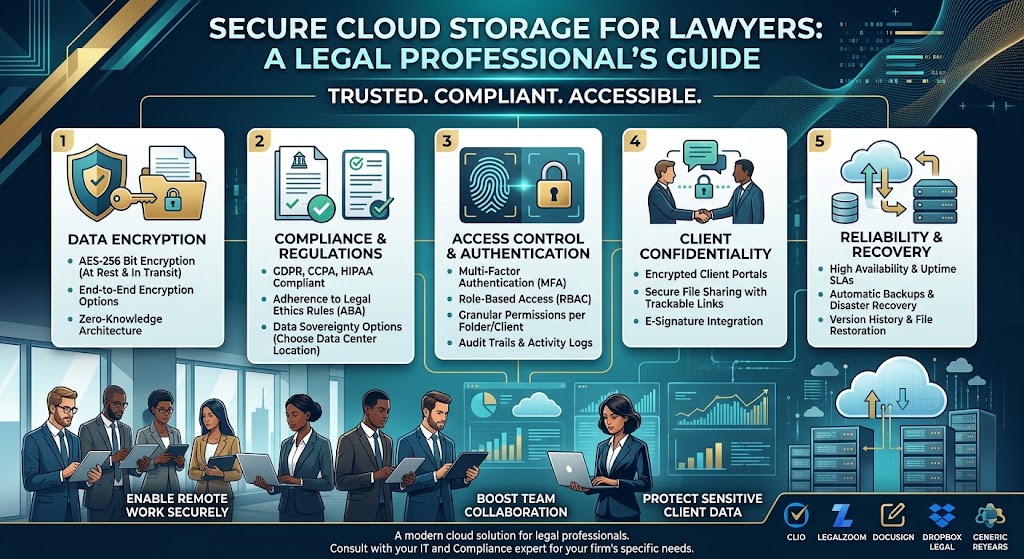
Lawyers, accountants and law firms handle some of the most confidential information a business can store: client records, contracts, tax returns, financial statements, litigation documents and personally identifiable information. Choosing the best secure cloud storage solution is essential for protecting this data while allowing teams to work efficiently.
The right platform should provide strong access controls, encryption, reliable file sharing, audit capabilities and dependable recovery options. It should also support the confidentiality, professional obligations and regulatory requirements that apply to your practice.
Compare cloud storage optionsIn this guide, we compare secure cloud storage solutions for legal practices, accounting firms and professional services teams. We explain what to look for, how leading providers differ, and how to choose a platform based on your firm's size, budget and security requirements.
Best Secure Cloud Storage: Quick Comparison
| Platform | Best For | Main Strength | What to Verify |
|---|---|---|---|
| Microsoft OneDrive for Business | Law firms and accounting teams using Microsoft 365 | Integration with Office, Teams and SharePoint | License-specific security, retention and audit features |
| Google Workspace | Distributed firms and collaborative teams | Real-time document collaboration | Plan-level administration, sharing and compliance controls |
| Dropbox Business | Teams sharing large document collections | File synchronization and sharing workflows | Advanced access, audit and recovery capabilities |
| Box | Organizations with complex document governance needs | Enterprise content management and integrations | Governance features, add-ons and plan restrictions |
| Proton Drive | Privacy-focused professionals | End-to-end encryption for supported workflows | Business administration, collaboration and recovery needs |
No single cloud storage provider is automatically the most secure for every professional practice. Security depends on the selected plan, configuration, identity controls, employee behavior and the type of information being stored.
1. Microsoft OneDrive for Business
Microsoft OneDrive for Business is a practical choice for legal and accounting teams already using Word, Excel, Outlook, Teams and Microsoft 365. Files can be stored and synchronized in the cloud, while SharePoint provides additional capabilities for managing shared team documents and organizational content.
This integration can simplify daily work. Lawyers can collaborate on contracts, accountants can work with spreadsheets, and administrators can manage access through the organization's Microsoft environment.
Key advantages
- Integration with familiar Microsoft productivity applications.
- File sharing and collaboration on supported documents.
- Administrative controls available through compatible Microsoft 365 plans.
- Integration with SharePoint and Teams for team workflows.
- Business identity and access management options.
Potential limitations
- Advanced security and compliance features may require specific licenses.
- Complex sharing arrangements can be difficult to manage without clear policies.
- OneDrive and SharePoint serve different purposes and may need to be configured together.
Best for: Firms that rely on Microsoft Office and want cloud storage integrated with their existing productivity tools.
Explore Microsoft 365 for Business2. Google Workspace
Google Workspace combines Google Drive with Gmail, Docs, Sheets, Meet and other business tools. It is particularly useful for firms whose employees need to collaborate on documents from different locations and devices.
For example, a legal team can review a shared draft, an accounting team can collaborate on spreadsheets, and administrators can manage business accounts centrally. The availability of advanced reporting, data protection and administration features depends on the subscription.
Key advantages
- Real-time collaboration in compatible documents.
- Integrated business email, calendars, meetings and file storage.
- Centralized user and sharing administration.
- Browser-based workflows that can simplify remote work.
- Additional security controls available on eligible plans.
Potential limitations
- Some advanced security and compliance controls are plan-dependent.
- Complex Microsoft Office documents may not behave identically in every application.
- Organizations must carefully manage external sharing and user permissions.
Best for: Small and medium-sized firms that value browser-based collaboration and want email, storage and productivity tools in one ecosystem.
Explore Google Workspace3. Dropbox Business
Dropbox Business focuses on cloud file storage, synchronization and sharing. It can be useful for law firms and accounting practices that regularly exchange large document collections with colleagues, clients, external counsel or other professional partners.
Dropbox can also integrate with third-party productivity tools. Firms should evaluate how these integrations fit their confidentiality policies and whether the selected subscription provides the required administrative and security capabilities.
Key advantages
- File synchronization across supported devices.
- Shared folders and link-based document sharing.
- Integration with other business applications.
- Business-focused collaboration and administration features.
- Workflows designed around accessing and exchanging files.
Potential limitations
- Firms may need separate subscriptions for email and office applications.
- Advanced controls depend on the selected plan.
- External sharing requires consistent policies and oversight.
Best for: Professional teams that prioritize file sharing, synchronization and straightforward document access across devices.
Explore Dropbox for Business4. Box
Box is a cloud content management platform built around business document storage, sharing, collaboration and governance. It may suit larger law firms, accounting organizations and professional services businesses that need structured content workflows and integrations.
Depending on the subscription and configuration, Box offers capabilities for managing access, collaborating on files and supporting organizational content policies. Firms should check which governance, retention and security functions are included in the specific plan.
Key advantages
- Business-oriented content management.
- Tools for collaboration and controlled document sharing.
- Integrations with popular enterprise applications.
- Options suited to structured organizational workflows.
Potential limitations
- Advanced governance requirements may increase costs.
- Some organizations may need implementation and training.
- Available controls vary by subscription and add-on.
Best for: Firms that need more than basic cloud storage and want to evaluate enterprise content management and document governance.
Explore Box5. Proton Drive
Proton Drive is a privacy-focused cloud storage service offering end-to-end encryption for supported storage and sharing workflows. This approach can be attractive to professionals who want to reduce the provider's ability to access the contents of stored files.
However, encryption alone does not make a service suitable for every law firm or accounting practice. Before adopting Proton Drive, assess its administrative tools, collaboration features, recovery options, integrations and suitability for your organization's retention and compliance requirements.
Key advantages
- Privacy-focused design and end-to-end encryption for supported content.
- Secure file storage and sharing capabilities.
- A potential fit for professionals prioritizing confidentiality.
Potential limitations
- Business administration and collaboration workflows may differ from larger office suites.
- Some integrations may be less extensive than those of established productivity ecosystems.
- Organizations must carefully assess account recovery and business continuity.
Best for: Professionals who prioritize privacy and want to evaluate end-to-end encrypted cloud storage for their specific workflows.
Explore Proton DriveEssential Security Features for Lawyers and Accountants
When evaluating secure cloud storage for legal and accounting work, look beyond the provider's marketing claims. The following capabilities are particularly important when handling confidential client information.
Encryption in transit and at rest
Files should be protected while being transferred and while stored. Ask the provider about its encryption standards, key management, access model and whether end-to-end encryption is available for the workflows you need.
Multi-factor authentication
Require multi-factor authentication for employees and administrators. Where supported, consider phishing-resistant authentication methods for accounts with access to particularly sensitive information.
Granular permissions and secure sharing
Lawyers and accountants often work with clients, auditors, courts, vendors and external advisers. The platform should allow you to control who can view, edit, download or share documents, where those controls are supported.
Audit logs and administrative visibility
Audit capabilities can help administrators investigate unusual activity, review access events and demonstrate that internal procedures are being followed. Check how long logs are retained and which subscription includes them.
Version history, recovery and backup
Version history can help restore earlier versions of documents, while recovery features can assist after accidental deletion or certain incidents. These features should not automatically be treated as a complete backup strategy. Establish independent recovery procedures and test them regularly.
Retention, legal holds and compliance support
Depending on the type of practice, firms may need retention schedules, records management, legal holds or defensible deletion. Verify that the provider and selected plan support your actual obligations.
Cloud Storage for Law Firms: Special Considerations
Legal practices handle privileged communications, contracts, evidence, case files and personal information. A suitable cloud storage system should support confidentiality while allowing authorized staff to access the correct documents when needed.
- Separate client matter folders and restrict access by case or practice group.
- Use secure sharing procedures for clients and outside counsel.
- Review confidentiality, data processing and contractual terms.
- Determine where information is stored and whether cross-border transfers are permitted.
- Establish retention, legal hold and secure deletion procedures where required.
- Document incident response and account recovery processes.
Lawyers should also consider applicable professional conduct rules and jurisdiction-specific confidentiality obligations before moving client files to a third-party service.
Cloud Storage for Accountants: Special Considerations
Accounting firms routinely handle tax returns, payroll records, bank statements, invoices, financial forecasts and identity information. Unauthorized disclosure can create significant financial and legal risks.
- Create separate access groups for payroll, tax, audit and bookkeeping teams.
- Use secure portals or controlled sharing for client document collection.
- Review external accountant, auditor and contractor permissions regularly.
- Protect spreadsheets containing bank details, tax identifiers and payroll data.
- Maintain appropriate records of access, retention and deletion.
- Test recovery procedures for critical financial documents.
Accounting practices should assess applicable tax, privacy, financial services and professional requirements in each jurisdiction where they operate. A general-purpose cloud storage subscription may need additional controls or complementary software to meet those needs.
Which Cloud Storage Is Best for Small Law Firms?
Small practices often benefit from choosing a platform that employees already understand and that combines storage with their existing productivity tools.
- Choose Microsoft 365 with OneDrive if the firm depends on Word, Excel and Outlook.
- Choose Google Workspace if browser-based collaboration and integrated email are priorities.
- Consider Dropbox if file synchronization and sharing are the main requirements.
- Evaluate Box if the practice needs more structured content governance.
- Evaluate Proton Drive if end-to-end encryption and privacy are central priorities.
These are starting points rather than universal rankings. The final decision should reflect the firm's client confidentiality obligations, technical requirements, budget and preferred workflow.
How Much Does Secure Cloud Storage Cost?
Business cloud storage prices vary according to the number of users, storage capacity, billing term and security features included. Some services bundle storage with email and productivity applications, while others focus more heavily on content management or encrypted file storage.
| Cost factor | Questions to ask |
|---|---|
| Subscription price | Is billing monthly or annual? Are there minimum user requirements? |
| Storage allowance | Is capacity allocated per user or pooled across the organization? |
| Security controls | Are audit logs, advanced identity controls and retention features included? |
| Administration | Will the firm need additional licenses or specialist support? |
| Migration | What will it cost to transfer files, restructure permissions and train staff? |
| Backup and recovery | Are independent backups or additional recovery services required? |
Check current business pricing directly with each vendor before purchasing. Promotional offers, regional pricing, taxes and plan features can change. For a professional firm, the lowest subscription price is not necessarily the lowest total cost once security and compliance needs are included.
Secure Cloud Storage Implementation Checklist
Use this checklist before migrating confidential business records.
0 of 8 completed
Frequently Asked Questions
What is the most secure cloud storage for lawyers?
There is no single best service for every lawyer. Microsoft OneDrive, Google Workspace, Dropbox, Box and Proton Drive offer different capabilities. Compare encryption, access controls, auditability, retention, recovery and contractual terms against your firm's requirements.
Is Google Drive secure enough for confidential legal documents?
Google Drive can support business document workflows when configured appropriately under a suitable Google Workspace plan. Firms should assess sharing controls, account protection, retention needs and applicable professional obligations before storing confidential files.
Is OneDrive suitable for accounting firms?
OneDrive can be a suitable option for accounting practices using Microsoft 365, especially when they collaborate on Excel and Office documents. Proper permissions, identity protection, recovery procedures and license selection remain essential.
Does end-to-end encryption guarantee complete security?
No. End-to-end encryption can reduce exposure of file contents, but it does not eliminate risks such as compromised accounts, unsafe devices, careless sharing or loss of account recovery credentials.
Should law firms use a separate backup service?
Firms should establish a recovery strategy that addresses accidental deletion, malicious activity, account compromise and business disruption. Cloud version history and recycle bins are helpful, but they should not automatically be considered a complete independent backup.
Can accountants store tax returns in the cloud?
Potentially, provided the selected service, configuration and operating procedures satisfy the firm's legal, contractual and professional obligations. Review access controls, data location, retention and applicable privacy requirements before migrating client records.
Final Verdict: Choosing Secure Cloud Storage for Professional Firms
The best secure cloud storage for lawyers, accountants and law firms depends on how your team works and which security controls it needs. Microsoft OneDrive is a strong candidate for Microsoft-centered offices. Google Workspace suits teams that prioritize browser-based collaboration. Dropbox is worth considering for file synchronization and sharing, while Box offers content governance capabilities and Proton Drive emphasizes privacy-focused encrypted storage.
Before committing, compare the exact business plans, verify contractual and regulatory requirements, test access controls and document your recovery procedures. Protecting confidential client information requires both an appropriate platform and disciplined security practices.
Compare Microsoft business plans Compare Google WorkspaceDisclaimer: This article provides general technology information and is not legal, cybersecurity or regulatory advice. Verify current product features, contractual terms and compliance requirements with the relevant providers and qualified advisers.