
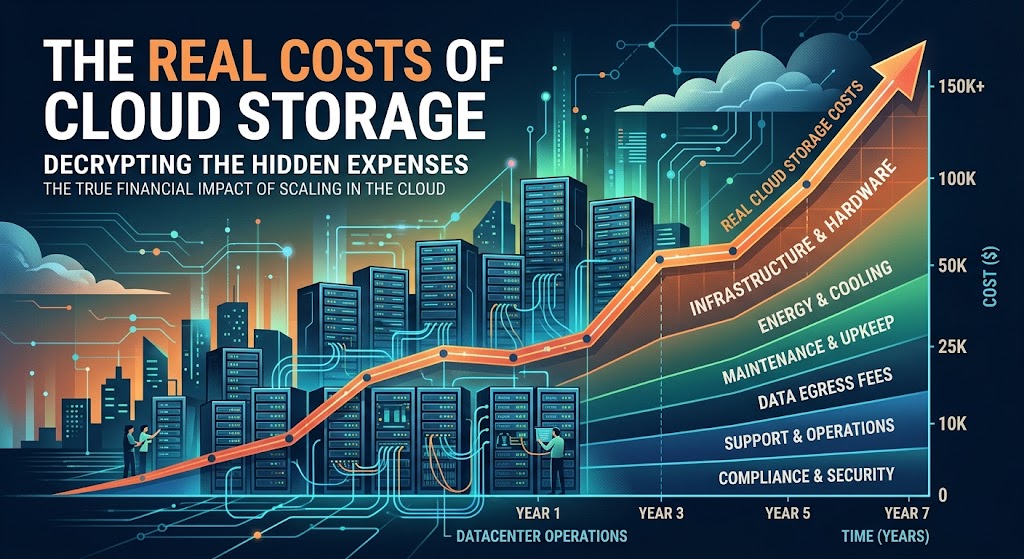
Cloud storage can look inexpensive when you compare a single subscription, but the real cost for a business depends on employee count, storage capacity, security requirements, backups and the tools included in the plan.
A small company might pay less than $100 per month for a basic team setup, while a larger organization can spend hundreds or thousands of dollars on storage, collaboration and data protection. The challenge is finding a plan that fits your workflow without paying for features your team does not need.
This guide compares business cloud storage pricing, explains the costs that are easy to overlook, and provides an interactive calculator to estimate your monthly and annual budget. Prices shown below are illustrative US-dollar list prices from published US business plans, not a quote for every country. Taxes, promotions, billing terms and regional pricing may change the final amount.
Cloud Storage Pricing at a Glance
These three common business options illustrate why you should compare the entire package rather than storage price alone.
Google Workspace Business Starter
Annual commitment, published US list price.
- 30 GB pooled storage per user
- Business email and collaboration apps
- Video meetings and administrative controls
Microsoft 365 Business Basic
Annual commitment, published US list price.
- 1 TB OneDrive storage per user
- Business email and web/mobile Office apps
- Teams and other business services
Dropbox Standard
Published US price; confirm the selected billing cycle at checkout.
- Starts with 3 TB of team storage
- File synchronization and sharing
- Team folders and administrator controls
Pricing checked for this article in October 2026. Plan names, eligibility, storage allowances and prices can change. Confirm the current terms on each provider's official pricing page before purchasing.
1. What Are Businesses Actually Paying For?
The phrase “cloud storage” can describe several different products. Some services primarily store and synchronize files, while others bundle storage with email, office software, video meetings and business security controls.
Standalone cloud file storage
These services focus on storing, synchronizing, sharing and managing files across devices. They can be a good fit for businesses that already have email and productivity software. Compare the total storage allowance, sharing controls, recovery history and the number of users included in the plan.
Business productivity suites
Google Workspace and Microsoft 365 combine cloud storage with other services. A subscription may cover business email, document editing, calendars, meetings and administration in addition to file storage.
For this reason, the cheapest standalone storage plan is not necessarily the lowest-cost option for the business as a whole. If your team already pays separately for email and office software, consolidating subscriptions may reduce costs.
Cloud backup services
Backup products protect files and systems so that data can be recovered after accidental deletion, device failure or certain cyberattacks. They may charge by device, computer, user, server, storage capacity or data usage.
Do not assume a synchronized cloud folder is a complete backup. If a file is accidentally deleted or encrypted by ransomware, the change may synchronize to other devices. Businesses with important records should budget separately for backup and recovery.
2. Business Cloud Storage Pricing Compared
| Service and plan | Published price | Storage allowance | Best suited for |
|---|---|---|---|
| Google Workspace Business Starter | $7/user/month | 30 GB pooled per user | Small teams using Gmail and browser-based collaboration |
| Google Workspace Business Standard | $14/user/month | 2 TB pooled per user | Teams needing more shared capacity and collaboration features |
| Google Workspace Business Plus | $22/user/month | 5 TB pooled per user | Organizations needing more storage and additional administration features |
| Microsoft 365 Business Basic | $7/user/month | 1 TB per user | Teams needing OneDrive, email and web/mobile Office apps |
| Microsoft 365 Business Standard | $14/user/month | 1 TB per user | Teams needing desktop Office applications as well as cloud storage |
| Dropbox Standard | $15/user/month | Starts at 3 TB for the team | Teams prioritizing file synchronization and sharing |
| Dropbox Advanced | $24/user/month | Starts at 15 TB for the team | Teams needing more storage and extended recovery features |
US list prices shown for comparison, generally using annual billing where applicable. Google storage is pooled across the organization, subject to plan rules. Microsoft storage allowances and Dropbox team-storage terms also have specific conditions. These products are not directly interchangeable on storage alone.
3. How Much Will Cloud Storage Cost for Your Team?
A per-user price makes it easy to estimate your starting budget. Multiply the monthly rate by the number of licensed employees, then add any separate backup, security, migration or support costs that apply to your setup.
| Team size | $7/user/month | $14/user/month | $15/user/month | $24/user/month |
|---|---|---|---|---|
| 5 users | $35/month | $70/month | $75/month | $120/month |
| 10 users | $70/month | $140/month | $150/month | $240/month |
| 25 users | $175/month | $350/month | $375/month | $600/month |
| 50 users | $350/month | $700/month | $750/month | $1,200/month |
These are simple estimates before taxes, add-ons and other services. They assume every employee has the same license and do not account for minimum seats, storage upgrades or negotiated enterprise agreements.
4. Interactive Cloud Storage Cost Calculator
Estimate the subscription cost for your team. Choose a per-user monthly price, enter your number of users and add an optional monthly budget for backup or other storage-related services.
Estimates exclude taxes, discounts, setup fees and changes in usage.
5. Hidden Costs That Can Increase Your Cloud Storage Bill
Additional storage capacity
A low-cost plan may offer enough capacity for documents but not for video projects, design files, customer records or large archives. Before buying, estimate current usage and how quickly it is growing. Check whether extra capacity is purchased per user, per team or through a separate storage add-on.
Annual versus monthly billing
Some providers charge more for flexible monthly subscriptions than for an annual commitment. Annual billing can reduce the effective monthly rate, but it also creates a longer commitment. Compare the total contract value and cancellation terms instead of focusing only on the headline monthly figure.
Backup and disaster recovery
Storage, synchronization and backup solve different problems. A separate backup service may create an additional recurring expense, but it can be important for recovering from accidental deletion, device failures and ransomware incidents.
Security and compliance
Some businesses need advanced access controls, retention policies, audit logs, data-loss prevention, single sign-on or other security features. These may be included only in higher tiers or sold separately. Businesses handling sensitive information should verify the features required by their contracts and applicable regulations.
Migration and employee training
Moving files from a legacy server or another cloud service can require staff time, an external consultant or a migration tool. Folder permissions, shared links, file versions and access rights also need to be checked. Budget for the initial transition rather than treating it as cost-free.
Data transfer and retrieval
Costs can depend on how frequently you upload, download, restore or move large amounts of data. This is particularly important for infrastructure-oriented object storage and backup services. Check data retrieval charges, request fees, transfer allowances and minimum storage durations where applicable.
Unused licenses
Companies sometimes continue paying for accounts belonging to former employees or inactive contractors. Review licenses regularly, remove access when people leave, and choose the right mix of user plans where the provider permits it.
6. Cloud Storage vs. Cloud Backup: Which Should Your Business Buy?
| Requirement | Cloud storage | Cloud backup |
|---|---|---|
| Collaborate on documents | Usually a core feature | Not usually the primary purpose |
| Synchronize files between devices | Common feature | Depends on the backup product |
| Recover deleted or older files | Depends on version history and retention | Usually a key use case |
| Protect entire computers or servers | Not typically the main function | Often supported by dedicated products |
| Work together in real time | Often supported | Usually not the main function |
Many small businesses need both. Use a cloud drive for everyday collaboration and a separately managed backup system for important files and devices. Check that backup copies have suitable retention, access controls and restore procedures.
7. How to Reduce Cloud Storage Costs Without Sacrificing Security
- Audit current storage. Identify duplicate files, outdated exports and unnecessary copies before purchasing more capacity.
- Match licenses to actual needs. Not every employee needs the most expensive plan or the same desktop applications.
- Compare bundled services. If your company pays separately for email, document editing and cloud storage, a business suite may reduce the overall bill.
- Review sharing permissions. Organize team folders and access rights so people can find what they need without creating unnecessary duplicates.
- Check annual pricing carefully. Compare the savings with the length of the commitment, renewal terms and your likely staffing changes.
- Keep a separate backup. Do not remove necessary backup protection simply to lower the subscription bill.
- Review usage every quarter. Check storage growth, inactive licenses, restore history and whether the selected tier still fits the business.
8. Which Cloud Storage Plan Is Best for Different Businesses?
Freelancers and solo businesses
A single-user plan or an entry-level productivity suite may be enough if you mainly store documents, send invoices and collaborate with a few clients. Prioritize reliable synchronization, sharing controls and recovery features.
Small businesses with 5–15 employees
Compare Google Workspace and Microsoft 365 if your team needs email and productivity software as well as storage. Dropbox is worth considering if its file synchronization and sharing workflow better fits your team's work. Estimate the total cost for every employee, not just the administrator account.
Growing businesses with 25–100 employees
At this scale, account management, access policies, onboarding, offboarding and data recovery become more important. Compare pooled storage against per-user allowances, and check whether you can combine license types without creating unnecessary complexity.
Businesses with large media files or archives
Video production, architecture, engineering and data-heavy teams may need much more storage than a standard office team. Compare specialist storage and object-storage services as well as conventional cloud drives. Include transfer and retrieval charges in the calculation.
Regulated or security-sensitive organizations
Legal, healthcare, financial and other sensitive workflows require more than a low price per terabyte. Evaluate encryption, administrator controls, audit capabilities, retention, data residency, recovery and contractual terms. Verify whether the chosen plan meets the actual requirements of your organization.
Frequently Asked Questions
How much does business cloud storage cost per user?
Published US business plans can start around $7 per user per month for entry-level productivity suites. Other team storage plans may cost more, depending on storage allowances, collaboration features and security controls. Always check the current regional price and billing terms.
Is cloud storage cheaper than maintaining an on-site server?
It depends on the business. Cloud storage reduces the need to purchase and maintain some on-site hardware, but recurring subscriptions, migration, backup and data-transfer expenses can add up. Compare total costs over several years, including staff time, hardware replacement, support and downtime risks.
Is Google Workspace cheaper than Microsoft 365?
Their entry-level US business plans are both listed at $7 per user per month on annual billing. The better value depends on storage allowances, desktop applications, email, collaboration and the tools your team already uses. Compare equivalent tiers rather than price alone.
Does business cloud storage include backup?
Some services provide file version history and recovery, but this is not necessarily the same as a separate backup of computers, servers and business data. Review retention periods and recovery capabilities, and consider an independent backup for important information.
Can businesses pay for extra cloud storage only when needed?
That depends on the provider and plan. Some use pooled team storage, others allocate capacity per user, and infrastructure services may bill based on actual usage. Check the upgrade process and whether extra capacity creates a recurring commitment.
What is the biggest hidden cost of cloud storage?
There is no single answer. For one company it may be extra storage; for another, backup, security add-ons, data migration, unused licenses or data retrieval. Calculate the full cost of the workflow rather than just the base subscription.
Final Verdict: Calculate the Total Cost, Not Just the Subscription
The real cost of cloud storage for a business is the price of keeping files accessible, secure and recoverable for the people who need them. A $7-per-user plan can be excellent value when it includes the right business tools, while a more expensive service may make sense for teams that need larger shared storage, advanced controls or specialized collaboration.
Start by counting users, estimating storage needs and listing the tools your business already pays for. Then compare the full annual subscription cost, any additional security and backup services, and the cost of moving your files. That approach gives you a more realistic budget and helps avoid paying for capacity or features you will never use.
Prices and features are subject to change. Confirm current terms with the provider before purchasing. This article is for general budgeting and informational purposes.